
Get bulk orders for 30% less than local suppliers, plus free samples.
Get bulk orders for 30% less than local suppliers, plus free samples.
You spent hours perfecting your design in Adobe Illustrator or Photoshop. The neon purple looked electric on your monitor! But when the box of custom stickers arrived, that vibrant purple turned into a dull, muddy plum.
As a professional designer and printer, I see this "Color Gap" every day. The truth is: Your screen is lying to you.
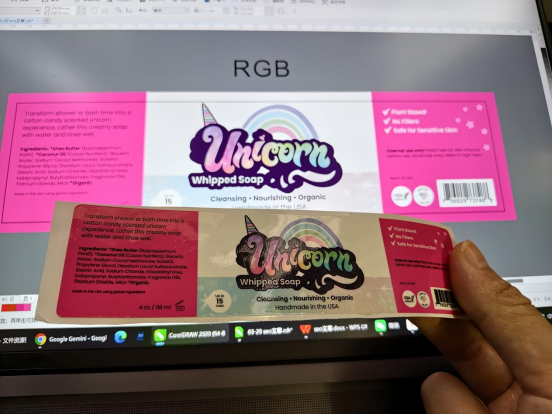
Your screen uses RGB (Red, Green, Blue) light to create colors. It can produce millions of bright, neon-like shades. However, industrial printers use CMYK (Cyan, Magenta, Yellow, Black) ink.
Many "electric" colors simply don't exist in the physical ink world. When you convert an RGB file to CMYK, the software tries its best, but the result is often "flatter" and darker.
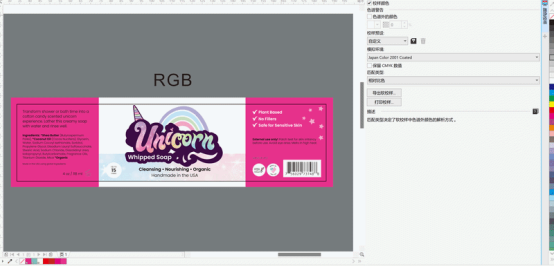
We don't just hit "Print" and hope for the best. Since we handle the design files (AI/CDR) ourselves, we take extra steps:
Manual Color Correction: We manually adjust the curves in Photoshop to bring back as much saturation as possible before printing.
The "Gloss" Factor: Choosing a Glossy Finish can actually make colors appear more vibrant than a Matte finish because of how light reflects off the surface.
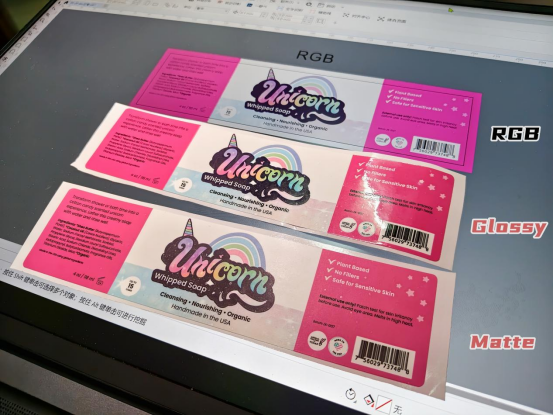
To get the best results, follow these 3 rules:
Design in CMYK Mode: Always set your document to CMYK from the start.
Use "Out of Gamut" Check: In Adobe Illustrator, press Ctrl + Y (or Cmd + Y on Mac) to see a realistic preview of the printed colors.
Order a Small Sample: If color accuracy is critical, always test a small batch first.
For Custom Sticker Inquiries, Contact Us:
Get a Free Color Consultation & Quote




 +8618128095554
 sales@stickerforgeco.com
 +8618128095554